Learning Objectives
- Identify the functions of CPU, GPU, NPU, RAM, storage, and I/O.
- Explain the difference between temporary working memory and persistent storage.
- Trace how data moves from an input device to a processor and back to an output.
- Recognize why buses and interconnects affect system performance.
- Build a simplified block-level architecture for a modern computer.
Theory & Fundamentals
CPU. Coordinates general-purpose instructions, operating-system tasks, branching, application logic, and control.
GPU. Executes many similar operations in parallel and is useful for graphics, simulation, and highly parallel AI workloads.
NPU. Accelerates neural-network tensor operations with high efficiency, especially for inference.
Memory and storage. RAM provides fast temporary working space; storage retains programs and data when power is removed.
Unique Visualization
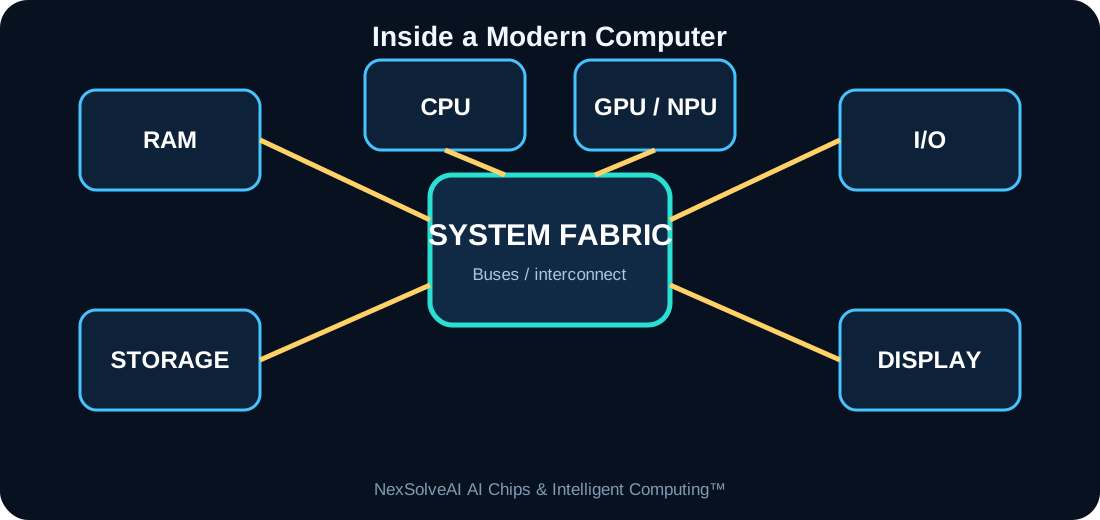
This figure is specific to AC-02 and illustrates the core architecture or dataflow discussed in this lesson.
Interactive Experiment
CPU load—
GPU/NPU load—
RAM traffic—
System balance—
Move the workload between general computing and AI acceleration.
Real-World Case Study
An AI laptop may open a video file from storage, place frames in RAM, use the GPU or NPU for AI enhancement, and let the CPU coordinate the user interface and file operations.
Case-study task: Identify the most important compute, memory, power, and data-flow requirements in this example.
Engineering Challenge
Trace the path of one webcam frame through a computer running background-blur AI. Identify which blocks participate and why.
Common Misconceptions
- Headline specifications should not be interpreted without workload context.
- Compute, memory, data movement, software, and power interact as one system.
- More hardware resources can show diminishing returns when another subsystem is limiting performance.
Interactive MCQ Quiz
1. Which component normally holds active program data temporarily?
2. Which block is primarily general-purpose?
3. Why are interconnects important?
Select your answers and submit the quiz.
Nexa AI Chip Tutor™
The future connected tutor can explain Inside a Modern Computer, interpret this module's experiment, and answer learner questions based on the current settings.
Suggested prompt: “Explain the experiment in AC-02 and tell me why the bottleneck changes when I move the sliders.”
Downloads
References & Further Study
- Computer architecture and digital systems textbooks
- Semiconductor and processor manufacturer educational documentation
- AI hardware, edge-computing, and embedded-systems documentation